 Witness Camera
What else is out there
I built one of these. Here is the honest version anyway.
I get asked how Witness compares to the other options often enough that it seemed worth writing down properly, including the parts where mine is not the answer. I have a stake in this, so read it with that in mind, and check the store listings yourself.
What I actually verified. Everything below about other apps comes from their own App Store or Google Play listings, read in August 2026. I have not run any of them through a real encounter, and I am not going to pretend otherwise. If I got something wrong about your app, email me and I will fix it.
The only question that really matters
Ignore feature lists for a second. There is one question that decides whether any of this works: when does the video leave the phone?
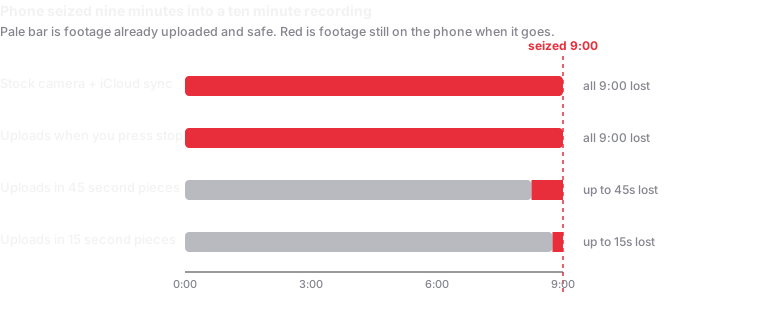
If the answer is "when you press stop," then a phone taken during the encounter takes everything with it. That is not a small gap. It is the entire scenario. Everything else, black screens, widgets, emergency contacts, is secondary to that.
Almost every guide to filming police tells you to make sure your video is syncing to the cloud. Almost nobody points out that the usual way of doing that has exactly this problem.
Cop Watch Video Recorder
$1.99, 4.0 stars from 34 ratings, by Pelau Imagineering.
This is the closest thing to a direct competitor, and I want to be straight about it: it does continuous upload too. Its listing says the app "uploads your video every 45 seconds," alongside the older behaviour of starting the upload when you stop. So the core idea is not something I invented, and any page telling you otherwise is selling you something.
Where it differs: it uploads to iCloud only, so you get whatever iCloud storage you have and no choice of destination. There is no black screen, though it has a Silent Mode so it stops announcing itself out loud. And there is nothing about hashing or timestamps, so you get the video but not a way to prove it is unedited.
The thing I would actually weigh: the listing shows version 3.4, last updated 16 August 2021. Five years without an update, across five major iOS releases. That does not mean it is broken. It does mean nobody is fixing it when it breaks.
TurnSignl
Subscription, iOS 15 and up.
This is a genuinely different product and honestly the more interesting one. It connects you to a real attorney licensed in your state, live on video, while the stop is happening. The recording is a side effect; the lawyer is the point. In 2026 they added 60-plus languages and support for immigration matters.
If what you want is a lawyer, buy this, not mine. I do not offer legal help of any kind and never will. The recording goes to your own cloud, which is fine, but you are paying for the attorney network, and if that is what you need then that is what you should pay for.
The obvious trade: it is a subscription with people on the other end, so it costs real money, and it is oriented around traffic stops rather than protests or raids.
Legal Equalizer
Its listing describes stream-to-cloud recording, sending video to three emergency contacts, and help finding a lawyer. I could not confirm the upload timing from public material, so I am not going to guess at it. Worth a look if the emergency-contact side is your priority.
Your phone's camera plus iCloud or Google Photos
This is what most people actually use, and it deserves a serious answer rather than being dismissed.
It is free, it is already on your phone, there is nothing to set up, and no app can be blamed for failing. For a lot of situations that is genuinely enough, and I would rather someone film with the stock camera than not film.
The problem is specific. Photo library sync was built for convenience, not for this. It commonly waits for Wi-Fi, holds off when the battery is low, and, most importantly, treats your recording as one file that is not eligible to upload until you stop recording. A twelve minute video uploads nothing at minute eleven.
So the footage you most want to survive, the last few minutes before someone takes the phone, is precisely the footage still sitting on it.
The Siri shortcut
"Hey Siri, I'm getting pulled over" dims the screen, starts the front camera, messages a contact and drops the video in iCloud when it finishes. Free, hands-free, no install.
I think everyone should set this up regardless of what else they use. It costs nothing. It has the same upload-at-the-end limitation as everything above, and it is front-camera oriented, which suits a traffic stop and not much else.
Where Witness stands
Roughly 15 second pieces instead of 45. Your choice of Google Drive, Dropbox, Nextcloud or WebDAV instead of iCloud only. The screen is fully black rather than dimmed. Every piece is SHA-256 hashed on the device and the session manifest gets counter-signed by an independent timestamp authority, so someone can check the footage is unaltered without trusting me. There is no server on my end, so there is no copy of anything to subpoena.
Where it loses
No lawyer. TurnSignl puts a licensed attorney on the line. I put a file in your cloud account. If you are choosing between us for a traffic stop and you can afford it, theirs is the more useful product.
Nobody is watching. Mobile Justice sent footage to an ACLU affiliate who might act on it. Mine sends footage to you. That is better for privacy and worse if what you wanted was backup from an organisation.
Now on Android too, but new there. Witness Camera is on Google Play for Android 11 and later. This comparison is about iPhone apps. The Android version behaves the same where the platform allows, but Android shows a notification while recording that cannot be fully hidden, and its dual-camera mode is capped at 720p per camera. It has a much shorter track record than the iPhone version.
It needs setting up first. Not connected to a storage account, it saves nothing. Every app here works on the day; mine punishes you harder for skipping the five minutes beforehand.
Two ratings. Cop Watch has 34 and years of history. I have almost none. That is a real reason to be cautious and I would rather say it than have you discover it.
Apps and tools used at protests in Europe
This section covers what people use at demonstrations in Europe, including the student and school protests of autumn 2026. Everything below comes from each project's own website or store listing, read on 26 October 2026. I have not run any of them through a real encounter, and I have a stake in this comparison, so check the sources yourself.
- Urgence Violences Policières (UVP). Free, aimed at filming police violence in France, with a French collective behind it. Its listing says footage is filmed and stored on the collective's servers, it is rated 18+, and the latest version shown on its US listing is 1.4 from May 2020. The difference that matters: your footage goes to a third party's servers, not your own storage, and the listing shows no updates for years.
- Tella (Horizontal, a US nonprofit). Free and open source, for Android and iOS. It encrypts files as they are captured, hides them from the gallery, can disguise the app, and can share to Tella Web, Uwazi, ODK, Google Drive, Dropbox and Nextcloud. Its site says files can be submitted when you have a reliable connection and does not describe upload during recording. Where it wins: encryption and concealment for people at real risk.
- ProofMode (Guardian Project, WITNESS and partners). A free, open-source Capture app for Android and iOS built around provenance. Its site does not say whether it uploads while you record. Where it wins: verification attached to a camera app you already like.
- eyeWitness to Atrocities (a UK charity). Captures video with metadata and sends it into a chain of custody for legal use. It is built for documenting international crimes, and its site lists it on Google Play. It is not an everyday protest tool, and the footage is sent to the charity, which compiles it for investigators.
- Signal. Not a recorder, but several protest-filming guides, including those of Go Film The Police and Index, recommend sending footage promptly to a trusted contact through it.
As far as their own descriptions say, none of these sends your private footage to your own storage in pieces while you are still recording. That is the one thing Witness does differently. Each of the others does something Witness does not.
- If you are at real risk and need encryption and concealment, Tella is built for that and Witness is not.
- If you want verification on a camera app you already use, ProofMode.
- If you are documenting international crimes for a legal process, eyeWitness.
- If you want footage in your own cloud account while you are still filming, Witness. It records with the screen black and uploads every 15 seconds, and the hashes and time-stamp can be checked by anyone.
Two cautions that apply to Witness here. It always records sound, which matters under German law (German legal page). And it can record your location if you allow it, which some guides advise against. See Filming the police at student protests across Europe for where guides differ.
What I would actually tell a friend
Set up the Siri shortcut today, because it takes two minutes and costs nothing.
If you are documenting anything where the phone might be taken, protests, raids, anything with a crowd, use something that uploads during the recording. Mine or Cop Watch, but check whether Cop Watch still works on your iOS version before you rely on it.
If you drive a lot and worry about traffic stops specifically, and money is not the constraint, TurnSignl solves a problem none of the rest of us touch.
If what you actually want is a wider kit rather than this one category, the roundup of iPhone apps for filmmakers and journalists covers camera, audio, verification and editing, with the same conflict disclosed.
And if you are a legal observer or a journalist and the footage may end up contested, you want the hashing and timestamps, because "that video was edited" is the argument you will actually face.
Prices, ratings and features read from public store listings in August 2026 and they change. Nothing here is legal advice.