 Witness
Recording with the screen off
What that actually means on iOS, and what no app can do for you.
I build an app whose main feature is this, so I have an obvious interest. I am going to start with the two things most pages on this topic leave out, both of which are limits rather than features.
iOS will not record with the screen truly off
This is the first thing to be clear about, because a lot of writing on this implies otherwise.
iOS stops camera capture when an app goes to the background or the device locks. No ordinary third-party app can film with the display genuinely powered down, and any app claiming to is either doing something else or describing it loosely.
What is actually possible is keeping the app in the foreground and setting the display brightness to zero. The screen is on and rendering; it is just rendering nothing at no brightness. On an OLED iPhone that is visually indistinguishable from a phone that is off. This is what my app does, and it restores your previous brightness when the recording ends.
So the honest phrasing is dark screen, not screen off. The distinction matters because it tells you the failure modes: leaving the app, taking a call, or the phone locking will all stop the recording.
No app can hide the camera indicator
Since iOS 14 a green dot appears in the status bar whenever the camera is in use, and an orange one for the microphone. These cannot be turned off by any normal app, including mine. Apple made them mandatory precisely so that apps cannot record without the user knowing.
At zero brightness the indicator is still being drawn. It just is not visible, because the entire display including the status bar is dark. The indicator is not defeated, only unlit along with everything else. If someone raises the brightness, it is right there.
I mention this because "undetectable recording" is a claim some apps make and none of them can honour on a current iPhone.
The part that decides whether you should do this at all
A dark screen changes what a recording looks like. It changes nothing about whether you are allowed to make it.
Recording on-duty police in public is constitutionally protected in the United States when you are lawfully present and not interfering. Every federal circuit that has squarely considered it has said so. This is the use this app is built for, and the one I would defend.
Recording private individuals is a completely different question. Federal law and most states allow recording a conversation you are part of, but a minority require every party to consent, and those statutes carry real penalties. Recording anyone in a place where they have a reasonable expectation of privacy, a bathroom, a changing room, a bedroom, is a serious criminal offence essentially everywhere, and no framing of intent changes that.
If your reason for wanting a dark screen is that the person being recorded would object if they knew, stop and find out what the law where you live actually says before you do it. That is not a disclaimer, it is the practical advice.
Why you would legitimately want it
Three reasons, in the order they actually matter:
The phone does not read as a camera. Safety guidance for filming law enforcement is consistent that you should hold your phone openly rather than half-concealed, because an unidentifiable object in a hand is what gets mistaken for a weapon. A dark screen is what makes that advice cheap to follow: you can hold the phone up in plain sight without it visibly being a camera pointed at someone. You get the safety of visible without the escalation of obvious.
It works in a pocket or on a dashboard. A bright viewfinder in a dark car or a pocket is a light source. A dark one is not.
It does not advertise how long you have been recording, or that you are recording at all, to someone glancing at the phone.
How to actually do it
Options, from free to less free.
Turn your brightness all the way down manually. Free, works today, no install. Swipe into Control Centre and drag the brightness slider to the bottom before you start the stock Camera app. The screen will be very dim rather than black, the viewfinder is still faintly visible in the dark, and auto-brightness may fight you, so turn that off first in Settings, Accessibility, Display and Text Size. This is a genuinely reasonable answer if you need it once.
Add a Siri shortcut. "Hey Siri, I'm getting pulled over" style shortcuts typically dim the display, start recording and message a contact. Free, hands-free, and worth setting up regardless of what else you use. It records to your camera roll and uploads when the recording finishes.
Use an app built for it. Mine sets brightness to zero, renders a fully black view, and requires a deliberate triple-tap followed by a press-and-hold to stop, so it cannot be ended by a stray touch or by someone grabbing the phone. It also uploads while recording, which is a separate feature and the one I would argue matters more.
Does it save battery?
Some, and less than you would hope.
On an OLED iPhone a black pixel is essentially off, so the display cost of a dark screen falls close to zero, and the display is normally a large share of power draw. But while recording, the camera sensor, the video encoder and any upload are all running at full cost, and they dominate. You will get a useful improvement in recording time, not a transformative one.
For anything long, bring a power bank. That advice has not changed in a decade.
What a dark screen does not do
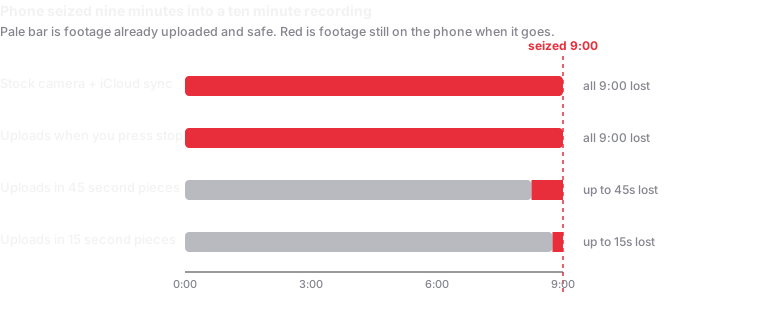
It does not protect the footage. A phone that is taken still has the recording on it. Getting the video off the device while you are still filming is a different problem and, I would argue, the more important one.
It does not survive leaving the app. A call, a lock, or switching apps ends the recording, because iOS ends camera capture.
It does not make you invisible. You are still a person holding a phone up, and anyone can raise the brightness.
It does not make an unlawful recording lawful.
Related
- How to record police safely, where the dark screen fits into the wider question of distance, framing and narration.
- What the courts have actually held about filming law enforcement, seizure and audio consent.
- How the upload works, if the footage surviving is what you actually came for.
Written August 2026, against iOS 26. Apple changes these behaviours between releases. Nothing here is legal advice.